546 - bombShield(int a, int script)
Sets the bomb invulnerability flag (a=0 false, a=1 true), the caller's ANM script will change to script when a bomb is active.
611 - etEx(int etId, int async, int type, float a, float b)
Adds bullet transformation to bullet manager etId, Transformation of flag type determines the specific behaviour of the bullet. Documentation can be found here.
BulletEffectType-67108864 - etExDelay(string et, string isAsync, string time)
Hide the bullet for time frames. During this time, it will not move, will be invisible and won't have a hitbox. If used as a first transformation, can be used to delay when the bullet actually appears.
6 - isDelayedSpawn
While this flag is set, the bullet will be invisible and not have a hitbox. This flag is cleared once the delay timer ends.
4 - short_timer
Integer value between -1 and 15 inclusive (by default -1). If non-negative, shooters using short_timer shoot their bullets and timer increments by 1 per frame until 15 is reached. Once 15, timer reset to -1 or 0 depending on Z key state.
5 - long_timer
Integer value between -1 and 120 inclusive (by default -1). If non-negative, shooters using long_timer shoot their bullets and timer increments by 1 per frame until 120 is reached. Once 120, timer reset to -1 or 0 depending on Z key state.
91 - floatTime(int slot, float var, int time, int mode, float start, float final)
In time frames using mode mode, variable var changes from start to final. slot is used to set the slot to be used by this ins, every enemy has 8 slots.
-9980 - F1
Local float variable, inherited by spawned enemies.
-9984 - I1
Local integer variable, inherited by spawned enemies.
-9989 - ANGLE_PLAYER
Angle from the enemy to the player.
-9962 - BOSS_Y
Final Y position of the boss.
-9990 - PLAYER_Y
Player's Y position.
-9963 - BOSS_X
Final X position of the boss.
-9991 - PLAYER_X
Player's X position.
81 - circlePos(float varX, float varY, float angle, float radius)
Performs following operation: varX = cos(angle) * radius and varY = cos(angle) * radius
-9981 - F0
Local float variable, inherited by spawned enemies.
300 - enmCreate(string sub, float x, float y, int hp, int score, int item)
Creates an enemy using subroutine sub at coordinates (x, y) (relative to position of the parent), health of created enemy is hp, score bonus is score and item drop is item.
601 - etOn(int etId)
Shoots bullet(s) using properties from bullet manager etId.
23 - wait(int time)
Stops sub execution for time frames.
1 - delete()
Returns to the top of current call stack.
2 - GAME_SPEED
The value controls by how much faster the game speed is run. This variable is often set to a number between 0 and 1. This value is often changed when a (final) boss dies or when a photo is taken. Its default value is 1.
-9985 - I0
Local integer variable, inherited by spawned enemies.
-9983 - I2
Local integer variable, inherited by spawned enemies.
-9982 - I3
Local integer variable, inherited by spawned enemies.
-9954 - ENEMY_HP
Enemy's current HP.
3 - goheiExists
A flag that determines if a gohei exists on-screen or not. Flag is set to true by active gohei. Flag is set to false if gohei goes off-screen or is despawning.
Gohei Duplication
- Versions:
 1.00a - 1.00b
 - Difficulty: Easy - Normal - Hard - Lunatic - Extra
- Mode: Main game - Practice mode - Spell practice
- Shottype: ReimuA -

ReimuB-MarisaA-MarisaB-SakuyaA-SakuyaB
ReimuA can have multiple goheis on screen. All goheis are able to deal damage. Because of this, it is possible to speedkill by using multiple goheis. The goheis stay active as long as you keep shooting, meaning you cannot carry them over to other stages. This also means you cannot maintain multiple goheis during dialogue, because you stop shooting.
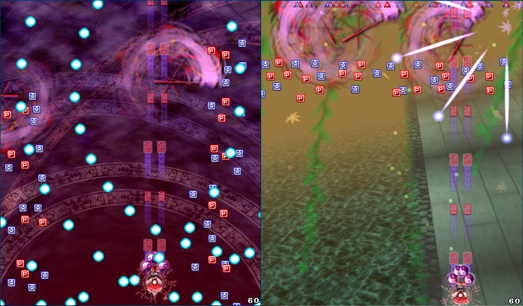
Note: this section is technical. If you want to learn a human set-up on how to do it, you can do so by clicking here.
There are two ways for a gohei to despawn:
- The player stops shooting (whether it's through unfocussing or not holding Z)
- The gohei goes off-screen
In order duplicate one gohei, the following procedure must be done:
- Have your first gohei (gohei 1) on-screen
- Stop shooting such that gohei 1 is in its despawning animation
- While the gohei 1 is despawning, spawn your second gohei (gohei 2)
- Before gohei 1 finishes its despawning animation, let gohei 1 despawn by going off-screen.
- On the next frame, spawn the third gohei (gohei 3)
- You are now left with 2 goheis (gohei 2 and gohei 3)
Note that step 5 may not work due to a complicated factor that is described in the next section. This complicated factor is not related to randomness but is deterministic.
This process can be done concurrently, meaning it is possible to spawn more than two goheis at once.
This set-up is most commonly done at the top of the screen due to step 4 being hard to execute if the gohei were to go off-screen elsewhere, even though it is possible.
Before we dive deeper into the cause of the gohei duplication glitch, we must first talk about the mechanics of the gohei. The topics discussed are as follows:
- Gohei dimensions
- Gohei target distances
- Gohei velocity
- Gohei despawn timer
- Gohei flag
- Shot cycle
- Player bullet slots
Each of these topics are relevant to the gohei dupe. After each of these topics have been discussed, two examples are provided along with an explanation.
The gohei has varying dimensions depending on the player's power level.
| Power level | Width (units) | Height (units) |
|---|---|---|
| 1 power | 64 | 64 |
| 2 power | 76.8 | 76.8 |
| 3 power | 89.6 | 89.6 |
| 4 power | 112 | 112 |
The gohei targets enemies differently based on when it was shot and how far away it is from the nearest enemy.
During the first 10 frames of spawning, if there is an enemy within 160 units of the spawn radius, the gohei targets the enemy and instantly locks onto the enemy.
After the first 10 frames, if there is an enemy within 320 units of its radius, the gohei targets the enemy but does not instantly lock onto the enemy.
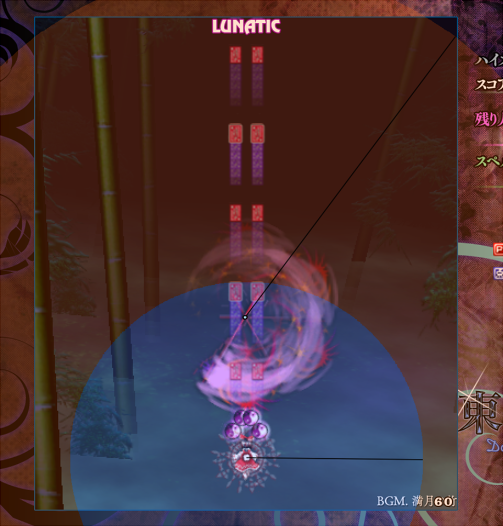
The gohei starts of with an initial upwards velocity of 14.4 units per frame. Assuming that the gohei does not target an enemy, and that the player is shooting focussed, this speed value is multiplied by 0.9 on every frame. If the player is not shooting focussed, the speed value is no longer multiplied by 0.9 thus the speed remains constant.
The gohei enters its despawning animation under one of two conditions:
- The gohei does not have a target, and the player is not focussed and is not shooting.
- The gohei does have a target, and the player is not focussed and is not shooting for more than 12 consecutive frames.
Once the gohei enters its despawning animation, the gohei has 10 frames before it is fully despawned.
The limit of 12 and 10 frames are hardcoded in the game.
To understand why multiple goheis can coexist, we must understand the flag goheiExists. goheiExists is a boolean that determines if a gohei exists on-screen or not. (Note: if you look for this value in the game's memory, it is actually not a flag, but an integer representing the power level. However, in the context of this page it is more comprehensible to represent goheiExists as a boolean.)
The following actions set goheiExists to true:
- Having an active gohei on-screen (done every frame by every gohei)
The following actions set goheiExists to false:
- Having a gohei go off-screen (done once)
- Putting the gohei into the despawning animation. (done once)
The following actions do not change the state of goheiExists:
- Having no goheis on-screen
- Having a gohei that is already in its despawning animation.
A gohei is considered to be off-screen if its full sprite is off-screen.
The shoot timer is a number between -1 and 14. This number is set to -1 by default.
- If the number is
-1and the player presses Z on the next frame, the number increments by1every frame until the number is14. - If the number is
14and the player presses Z on the next frame, the number is set back to0and increases by 1 every frame until the number is14. - If the number is
14and the player does not press Z on the next frame, the shoot timer is set to-1and the player stops shooting. - If the number is between
0and13, the shoot timer continues to increment regardless if the player presses Z or not. This means that the player keeps shooting bullets.
In the context of this webpage, if the number is between 0 and 14 it means that the player is shooting. If the number is -1 the player is not shooting.
If the flag goheiExists is false, and the number is a multiple of 3 (0, 3, 6, 9, 12), then the game spawns a gohei on the subsequent frame. This behaviour is coded in the file pl00a.sht, which is where most of the shottype data of ReimuA is stored.
The free player bullet list is a stack of size 256 whose elements are slots (IDs) for your player shots. The list starts from 255 and ends with 0 (so [255, 254, …, 0]). The order in which the bullets occupy a slot is manually decided in the pl00a.sht file.
For example, if you are shooting focussed for a frame, the following takes place in your sht:
- Left amulet takes up the first slot (slot 255)
- Right amulet takes up the second slot (slot 254)
- Gohei takes up the third slot (slot 253)
The free player bullet list would look as follows: [252, 251, …, 0].
The taken slots are freed up when the object is destroyed (e.g. by going off-screen, by hitting an enemy). Once a slot is freed up, the slot is pushed back in the order of despawning. This follows the Last In First Out (LIFO) principle, meaning the most recently added slot is the first to be accessed.
To continue the previous example, suppose the left amulet, the gohei, and the right amulet despawn in that order. The free player bullet list would be as follows: [254, 253, 255, 252, 251, …, 0].
Note that the gohei takes up a slot until it has fully despawned: if the gohei is in its despawning animation, its respective slot is still taken.
To understand why the player bullet list is relevant to the gohei dupe, we must understand how the flag goheiExists is set when there are multiple goheis on-screen.
In one frame, the following events are executed in order:
- If on the correct shot cycle, game spawns left amulet, right amulet
- If on the correct shot cycle, game spawns a gohei if the value of flag
goheiExistsisfalse - Game runs through every gohei in active player bullet list in ascending order of bullet slot
- For every gohei, the flag
goheiExistschanges depending on the current gohei's action
Step 3 tells that the order in which the goheis are processed depends on their position in the player bullet list. To have goheiExists be set to false for a frame, the gohei taking up the highest bullet slot must set goheiExists to false.
Below two explanations of gohei duplications are provided: The first explanation explains what happens during a double gohei, and the second explanation explains what happens during a quintuple gohei.
The following steps are performed sequentially:
- Spawn Gohei 1 (
GH1) - Put
GH1in its despawning animation - Spawn Gohei 2 (
GH2) - Let
GH1despawn by going off-screen - Spawn Gohei 3 (
GH3)
The player is left with two goheis: GH2 and GH3.
The full explanation goes as follows:
- We spawn
GH1, preferably at the top of the screen.goheiExistsis set totrue. We want to make sure thatGH1despawns by going off-screen on a frame that aligns with the shot cycle. Since in this case we spawnGH1at the top of the screen, there are three concepts to take into account: the player's y-coordinate, the speed of the gohei (which depends on when Shift is released), and the size of the gohei. - We put
GH1in its despawning animation, which we can only do if the gohei does not have a target. In this case, we can easily achieve this by unholding Shift for one frame.goheiExistsis set tofalse. - Because
goheiExistsisfalse,GH2can be spawned.goheiExistsis set totrue. GH1must despawn on a frame on which the shot cycle is divisible by 3. Additionally,GH1must occupy a bullet slot higher than whatGH2has.goheiExistsis set tofalse.- Because
goheiExistsisfalse,GH2can be spawned.goheiExistsis set totrue.
Note that we do not necessarily have to do the gohei duplication at the top of the screen: GH1 is able to go off-screen through the side or the bottom of the screen, though it is easier to manipulate the gohei going off-screen through the top. Additionally, to put the gohei into the despawning animation the player could stop shooting by either releasing the Shift or the Z key, although the latter is much harder to perform.
This section explains a gohei dupe that generates 5 goheis. This dupe is a TAS (Tool Assisted Speedrun) performed by Nylilsa using a custom stage. This custom stage does not modify the shottype ReimuA.
The following steps are performed sequentially:
- Spawn Gohei 1 (
GH1) - Put
GH1in its despawning animation
Steps 1-13 of this section are similar to the steps taken of the previous section, but in this case we repeat the steps multiple times. We do this to get multiple despawning goheis that are going off-screen.
- Spawn Gohei 2 (
GH2) - Put
GH2in its despawning animation - Spawn Gohei 3 (
GH3) - Put
GH3in its despawning animation - Spawn Gohei 4 (
GH4) - Let
GH1despawn by going off-screen - Spawn Gohei 5 (
GH5) - Let
GH2despawn by going off-screen - Spawn Gohei 6 (
GH6) - Let
GH3despawn by going off-screen - Spawn Gohei 7 (
GH7) - Put
GH6despawn in its despawning animation (goheiGH6was chosen arbitrarily) - Spawn Gohei 8 (
GH8) - Let
GH6despawn by going off-screen - Spawn Gohei 9 (
GH9)
The player is left with five goheis: GH4, GH5, GH7, GH8, and GH9.
Recall the steps taken in the How section: we repeat steps 1 and 2 at the start to spawn multiple goheis, put them in their despawning animation, and let them go off screen. This allows for more goheis to be generated because there are more instances of a gohei going off-screen.
The full explanation goes as follows:
- We spawn
GH1, preferably at the top of the screen.goheiExistsis set totrue. We want to make sure thatGH1despawns by going off-screen on a frame that aligns with the shot cycle. Since in this case we spawnGH1at the top of the screen, there are three concepts to take into account: the player's y-coordinate, the speed of the gohei (which depends on when Shift is released), and the size of the gohei. - We put
GH1in its despawning animation, which we can only do if the gohei does not have a target. In this case, we can easily achieve this by unholding Shift for one frame.goheiExistsis set tofalse. - Similar to step 1, we spawn
GH2at the top of the screen.goheiExistsis set totrue. - Similar to step 2, we put
GH2in its despawning animation.goheiExistsis set tofalse. - Again, similar to step 1, we spawn
GH3at the top of the screen.goheiExistsis set totrue. - Again, similar to step 2, we put
GH3in its despawning animation.goheiExistsis set tofalse. - Once again, similar to step 1, we spawn
GH4at the top of the screen.goheiExistsis set totrue. GH1must despawn on a frame on which the shot cycle is divisible by 3. Additionally,GH1must occupy a bullet slot higher than whatGH4has.goheiExistsis set tofalse.- One frame later
GH5can be spawned.goheiExistsis set totrue. GH2must despawn on a frame on which the shot cycle is divisible by 3. Additionally,GH2must occupy a bullet slot higher than whatGH4andGH5has.goheiExistsis set tofalse.- One frame later
GH6can be spawned.goheiExistsis set totrue. GH3must despawn on a frame on which the shot cycle is divisible by 3. Additionally,GH3must occupy a bullet slot higher than whatGH4,GH5, andGH6has.goheiExistsis set tofalse.- One frame later
GH7can be spawned.goheiExistsis set totrue.
We can only spawn a gohei once every 3 frames, and there is a limit of 10 frames before a gohei fully despawns, meaning we can have at most 4 goheis at the moment (GH4, GH5, GH6, and GH7). To continue the dupe, we need to despawn the gohei that takes up the highest bullet slot. We arbitrarily choose GH6 to be the gohei with the highest bullet slot taken. We spawn two enemies which are called Enemy 1 and Enemy 2. GH6 targets Enemy 1 while GH4, GH5, and GH7 target Enemy 2. We want to make sure that GH6 is more than 320 units away from Enemy 2 such that GH6 doesn't target Enemy 2. We want GH6 to exit the screen with a high enough velocity. We achieve this by letting Enemy 2 go off-screen and despawn.
- We put
GH6in its despawning animation, which we can only do if the gohei does not have a target. In this case, we can easily achieve this by unholding Shift for one frame.goheiExistsis set tofalse. - One frame later
GH8can be spawned.goheiExistsis set totrue. GH6must despawn on a frame on which the shot cycle is divisible by 3. Additionally,GH3must occupy a bullet slot higher than whatGH4,GH5,GH7, andGH8has.goheiExistsis set tofalse.- One frame later
GH9can be spawned.goheiExistsis set totrue.
Note that this is extremely difficult to do under normal circumstances. In order to generate 5 goheis, 3 goheis must be targeting an enemy, and 1 gohei must have enough velocity to go off-screen on its own. That one gohei must also be 320 units away from any enemy. On top of this, the unfocus and despawning must take place where the shot cycle is divisible by 3. Lastly, that one gohei must occupy a bullet slot whose ID is higher than every other gohei.
- Having to release Shift is not a requirement for the dupe to be done, but it is much harder this way.
- To perform the dupe, you do not need any enemies on-screen.
- The dupe can be performed regardless of the player's y-coordinate, but the set-up is much easier to achieve while being high on-screen.
- The dupe works if the gohei goes off-screen through the side or the bottom.
- The gohei dupe does not rely on RNG. The previously described inconsistency factor is the ordering of goheis in the player bullet list.
- Although understanding the bug makes the gohei dupe more consistent on a TAS-level, understanding the dupe may not necessarily make the bug easier to replicate in real time. This trick still requires skill to perform in real time.
- In theory, there can be up to 254 goheis (two slots must be devoted to the left and right amulet). However, the difficulty comes from letting a gohei despawn by going off-screen while maintaining your other goheis and keeping track of the player bullet list. Because of this, getting more than 4 goheis is a very difficult task to achieve, especially in an unmodified version of the game.
- If you want to perform the gohei dupe yourself, you can do so by clicking here.
- Replay
Nyby "Nylilsa". Lunatic, ReimuA, 1.00b. 「September 14, 2022」. Download link - Replay
Nylilsaby "Nylilsa". Lunatic, ReimuA, 1.00b. 「February 23, 2025」. Download link - Replay
Nya811by "Nylilsa". Extra, ReimuA, 1.00b. 「July 7, 2024」. Download link - Replay
KrishLNNby "Krishna". Lunatic, ReimuA, 1.00b. 「September 5, 2026」. Download link
- NNN_shooter. 「July 10, 2017」. "【TAS】TH14 DDC "Extra" ReimuA NN in 06:58.96" https://www.youtube.com/watch?v=r9DZlKJkDfo
- NNN_shooter. 「April 4, 2017」. "【TAS】TH14 DDC "Lunatic" ReimuA in 17:13.63" https://www.youtube.com/watch?v=bZfXgqf210k
- Helio Knight. 「June 22, 2022」. "Baby's first DDC ReimuA Gohei dupe" https://www.youtube.com/watch?v=1qKdnwl5-OE
- Nylilsa. 「September 21, 2024」. "5 goheis" https://www.youtube.com/watch?v=s96Bvwoptqg
- Krishna. 「September 6, 2026」. "DDC LNN (ReimuA)" https://www.youtube.com/watch?v=8W8_hqQ5tWA
- NNN_shooter. 「July 1, 2017」. "東方輝針城speedrunで重要なお祓い棒分裂の詳細(現状判明分 + 推測)" https://nnn-shooter.hatenablog.com/entry/ar1291350
- Wikipedia. 「n.d.」. "Stack (abstract data type)" https://en.wikipedia.org/wiki/Stack_(abstract_data_type)
- Khangaroo. 「n.d.」. "Touhou Patches" https://github.com/khang06/touhou-patches/tree/master/gohei_debug (This links to a patch that allows for debugging goheis run through thcrap. If you do not know how to install thcrap patches, ignore this link)
All Double Dealing Character pages: | |
|---|---|
| Score Underflow · Bulletless Kagerou · Marisa's Lasers · Barrier Bug · Gohei Duplication · Benben Spell 2 Crash · Screen-flipping Effect Undo · Slowdown Item Duplication · Timeouts on Tsukumo Sisters on Extra · Shinmyoumaru's 2nd Non-spell Bowl Breaking · Item Collection Bonus Persisting | All Frame-perfect-related pages: | All Shottype-related pages: |