546 - bombShield(int a, int script)
Sets the bomb invulnerability flag (a=0 false, a=1 true), the caller's ANM script will change to script when a bomb is active.
611 - etEx(int etId, int async, int type, float a, float b)
Adds bullet transformation to bullet manager etId, Transformation of flag type determines the specific behaviour of the bullet. Documentation can be found here.
BulletEffectType-67108864 - etExDelay(string et, string isAsync, string time)
Hide the bullet for time frames. During this time, it will not move, will be invisible and won't have a hitbox. If used as a first transformation, can be used to delay when the bullet actually appears.
6 - isDelayedSpawn
While this flag is set, the bullet will be invisible and not have a hitbox. This flag is cleared once the delay timer ends.
4 - short_timer
Integer value between -1 and 15 inclusive (by default -1). If non-negative, shooters using short_timer shoot their bullets and timer increments by 1 per frame until 15 is reached. Once 15, timer reset to -1 or 0 depending on Z key state.
5 - long_timer
Integer value between -1 and 120 inclusive (by default -1). If non-negative, shooters using long_timer shoot their bullets and timer increments by 1 per frame until 120 is reached. Once 120, timer reset to -1 or 0 depending on Z key state.
91 - floatTime(int slot, float var, int time, int mode, float start, float final)
In time frames using mode mode, variable var changes from start to final. slot is used to set the slot to be used by this ins, every enemy has 8 slots.
-9980 - F1
Local float variable, inherited by spawned enemies.
-9984 - I1
Local integer variable, inherited by spawned enemies.
-9989 - ANGLE_PLAYER
Angle from the enemy to the player.
-9962 - BOSS_Y
Final Y position of the boss.
-9990 - PLAYER_Y
Player's Y position.
-9963 - BOSS_X
Final X position of the boss.
-9991 - PLAYER_X
Player's X position.
81 - circlePos(float varX, float varY, float angle, float radius)
Performs following operation: varX = cos(angle) * radius and varY = cos(angle) * radius
-9981 - F0
Local float variable, inherited by spawned enemies.
300 - enmCreate(string sub, float x, float y, int hp, int score, int item)
Creates an enemy using subroutine sub at coordinates (x, y) (relative to position of the parent), health of created enemy is hp, score bonus is score and item drop is item.
601 - etOn(int etId)
Shoots bullet(s) using properties from bullet manager etId.
23 - wait(int time)
Stops sub execution for time frames.
1 - delete()
Returns to the top of current call stack.
2 - GAME_SPEED
The value controls by how much faster the game speed is run. This variable is often set to a number between 0 and 1. This value is often changed when a (final) boss dies or when a photo is taken. Its default value is 1.
-9985 - I0
Local integer variable, inherited by spawned enemies.
-9983 - I2
Local integer variable, inherited by spawned enemies.
-9982 - I3
Local integer variable, inherited by spawned enemies.
-9954 - ENEMY_HP
Enemy's current HP.
3 - goheiExists
A flag that determines if a gohei exists on-screen or not. Flag is set to true by active gohei. Flag is set to false if gohei goes off-screen or is despawning.
-9926 - GI0
Global integer value. Value is initialised to 0 on stage load but not on stage reset.
-9925 - GI1
Global integer value. Value is initialised to 0 on stage load but not on stage reset.
-9924 - GI2
Global integer value. Value is initialised to 0 on stage load but not on stage reset.
-9923 - GI3
Global integer value. Value is initialised to 0 on stage load but not on stage reset.
17 - distortion(int a)
Triggers distortion effects on the edge of the screen. The meaning of the argument is not entirely clear. SA uses a value of 1 to create distortion at the bottom of the screen, while UFO uses this same value to create distortion at the top.
539 - spell3(int id, int timeRate, int unused, string name)
Declares a spell-card with id id and name unused. The ID passed to the spell-creating function is id + difficulty - 2 (with easy=0, normal=1, ..., overdrive=5). timeRate determines how much time the spell circle takes to shrink (in frames), as well as how fast the spell bonus decreases.
514 - setInterrupt(int slot, int hp, int duration, string subroutine)
Sets an interrupt on slot slot. Once caller's HP reaches hp or duration frames have passed since this instruction was called, the caller will terminate all subroutines it's currently running and execute subroutine subroutine.
270 - enmCreate270(string sub, float x, float y, int hp, int score, int item)
Creates an enemy using subroutine sub at coordinates (x, y) (relative to position of the stage background camera), health of created enemy is hp, score bonus is score and item drop is item.
Stage 4 Desync
- Versions:
 1.00a
1.00a - Difficulty: Easy - Normal - Hard - Lunatic -

Extra - Mode: Main game -
Practice mode - Shottype: ReimuA - ReimuB - ReimuC - MarisaA - MarisaB - MarisaC
Replays of full runs always desync when started from Stage 4, typically making it appear as if you failed to clear the stage. This can be prevented by starting the replay from Stage 3 or earlier.
However, the replay desync usually happens quite late. For most, the desync happens when the big sunflower fairy spawns that shoots a lot of random popcorn bullets. Albeit rare, the desync can also happen in the section before the big sunflower fairy spawns.
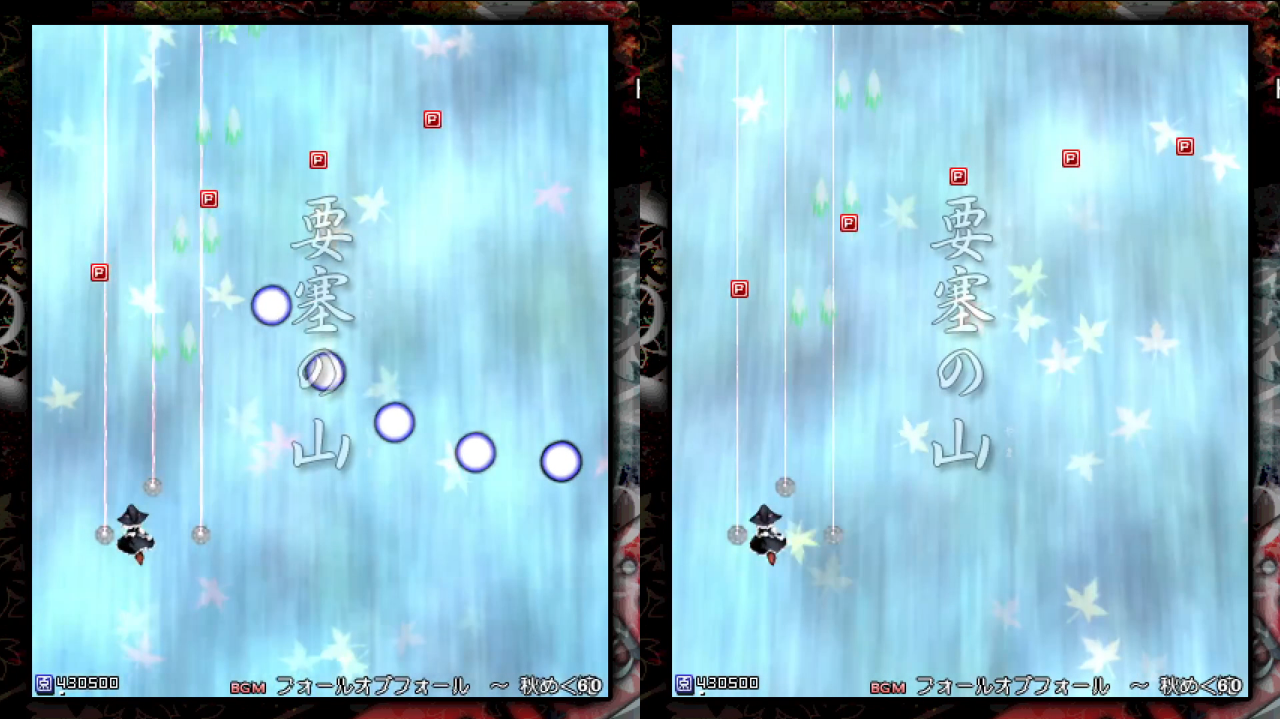
Essentially, there is a special instruction that allows for enemies to be spawned slightly differently than how enemies are usually spawned. I will refer to this instruction as enmCreate270. In MoF, enmCreate270 is only used in Stage 4. You can tell when enmCreate270 is used because the enemies that are spawned through enmCreate270 look like they appear from behind the waterfall.
In Stage 4, there are some sections where enmCreate270 is used. Below lists all the section where enmCreate270 is used:
- Intro chapter (fairies shoot mentos bullets)
- Second chapter (fairies shoot jellybean bullets on Lunatic)
- Before second sunflower fairy (fairies shoot mentos bullets)
- Before mid-boss (fairies shoot blue bullets and drop point items)
- After first crow chapter (fairies shoot mentos bullets)
- After chapter listed above (fairies shoot jellybean bullets on Lunatic)
On most of these sections, the fairies are spawned on a different place depending on how you watch the replay. The fairies only differ in height when they are spawned.
Because there is a height difference of the fairies when they are spawned, there are some obvious ways this could desync the replay. They will be classified as either obvious causes or obscure.
Below lists the obvious causes that could lead to the Stage 4 desync:
- Your player may not kill the fairy in time, which causes bullets to be shot that you die to.
- The bullets are shot from a different position, which may result in your replay for your player to dodge bullets too early.
- You may ram into the fairy.
- You miss collecting an item, which means you have too little power/lives from score extends.
These cases always happen by the fairies that are spawned through enmCreate270.
Based on a selection of replays I have watched (n=10), I have only encountered one desync that is caused by the obvious causes listed above.
Below lists the obscure causes that could lead to the Stage 4 desync:
- Some fairies call for RNG (Random Number Generation, i.e. randomness). "But wait, what RNG ?" Some of the fairies spawned through
enmCreate270call for RNG once when they are moving towards the player. Since there is a height difference of the fairies, sometimes your player may not kill a fairy in time. This causes the fairy to call for RNG when you start from Stage 3, and it causes the fairy to not call for RNG when you start from Stage 4. In the next section I will explain why calls for RNG is an issue. - Grazing bullets calls for RNG in MoF. Since the fairy position is different, the player may graze more or less bullets. In the next section I will explain why calls for RNG is an issue.
These cases are not visible by eye as a debugger was used to keep track of the stage's RNG.
The desyncs that are caused by what is listed above often happen during sections when an enemy is not spawned through enmCreate270. This has nothing to do with how enmCreate270 is programmed or anything, but the fairies that are spawned through enmCreate270 shoot bullets that never use RNG.
Based on a selection of replays I have watched (n=10), I have encountered eight desync that are all caused by the first sunflower fairy shooting popcorn bullets.
RNG is a value that is updated every time it is used. Each time it is updated, its current value is completely different from its previous value. In MoF, the RNG value is called for in various ways.
For example, let's say there is one enemy that shoots a bullet in a random direction. When the stage is loaded the RNG value is set to 12345. Then, when the enemy shoots the bullet, the enemy calls for RNG once by using the value 12345. After the bullet has been shot the RNG value is then updated to 3752. When the enemy shoots the bullet again, the direction is determined by the value 3752. This value is different than 12345 so the direction of the bullet is going to be different than how it was previously.
Most noticeable is when RNG is called by enemies when shooting bullets or when the enemy moves around randomly.
A more subtle of calling for RNG is when bullets are cancelled or when an enemy drops a lot of items. The items spawn in a small ring and they are spawned in a random position. When cancelling bullets, the bullets turn into green items that have a slightly random trajectory when they are first spawning.
An obscure way for calling RNG is when the player grazes bullets. There are small graze particles that are spawned when bullets are grazed. The particles have a random trajectory that is called by RNG.
Whilst Priw8's website does have documentation about the game's code, it does not have any about MoF. Despite this, I have conducted my own research and I will present everything I know about enmCreate270 below.
enmCreate270 is only limited to th10-th12. In MoF, enmCreate270 is only used in Stage 4. In SA, enmCreate270 is never used. In UFO, enmCreate270 is only used in Stage 1 for creating a background sprite that has no effect on the gameplay.
enmCreate270 is very weird. Below are image of the first five fairies of MoF stage 4 being spawned in various stages. The stages are all given the same piece of code, but the result is different in each stage !
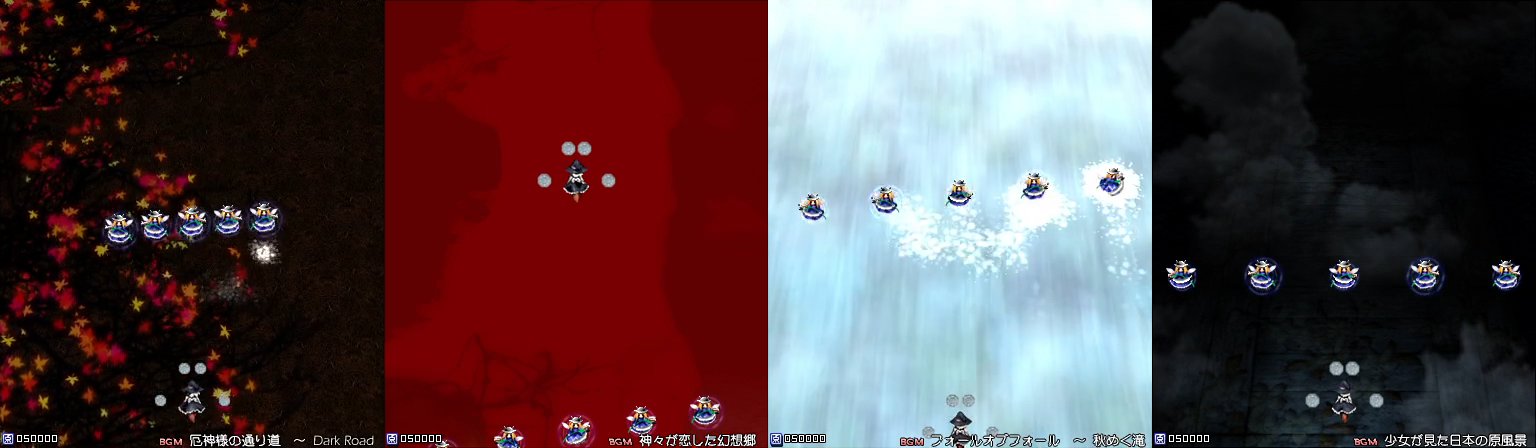
It turns out, enmCreate270 is affected by the stage's background scroll ! The instruction enmCreate270 spawns an enemy based on the camera scroll and the camera position, which are based on the stage background scroll.
As mentioned before, the instruction enmCreate270 spawns an enemy based on the camera scroll and the camera position, which are based on the stage background scroll. However, the camera scroll and camera position are dynamic, meaning their values change a bunch throughout the stage. This causes the same line of code of enmCreate270 to spawn enemies at a different position depending on the dynamic background scroll.
For whatever reason, the stage's background scroll is loaded slightly differently depending on which stage the replay is started from.
If a replay is started from Stage 4, then the stage background of Stage 4 is loaded right as the stage starts.
If a replay is started from Stage 3, then the stage background of Stage 4 is loaded during the stage transition.
The difference in time between the two events above is exactly 29 frames.
Any replay saved that reaches Stage 4 suffices, so none are provided in this section.
- Nylilsa. 「June 28, 2022」. "small th10 stage 4 comparison" https://www.youtube.com/watch?v=0avljm0XfpA
All Mountain of Faith pages: | |
|---|---|
| MarisaB 3 Power Damage · Corrupt replays · Stage 4 Desync · Bullet hitboxes glitch · Stage transition Desync · The 2038 problem · Slowdown Item Duplication | All Desync-related pages: | All Stage transition-related pages: |